
Get started
Welcome to Teskale. This script was created by robertdayzen. You can visit the robertdayzen profile to purchase the script.
Important information: Avoid pirated software, friends. Respect for effort. :)
I would also like to thank you for purchasing and supporting this product.
While developing this product, we pay special attention to each line of the code. We follow what kind of script people want and strive to do our best.
This document will help you easily install Teskale on your server and quickly answer the frequently asked questions of Teskale clients.
Teskale requirement
Before we start the installation, make sure you have the following extensions installed on your server.
1. MySQLi Extension
2. PHP 7.2.x +
3. PHP MB-string
4. PHP Zip
5. cURL Module
6. GD Library
Installation Upload the script to the server
To install Teskale, you need to upload the files in the folder named Script in the file you downloaded from CodeCanyon to your server.
This can be your live server or local server, but the fact is that you need to upload all script files including folders to the root directory of the HTTP server. Mostly this directory is called public_html or (www)
The directory containing the contents of the script is as in the image below:
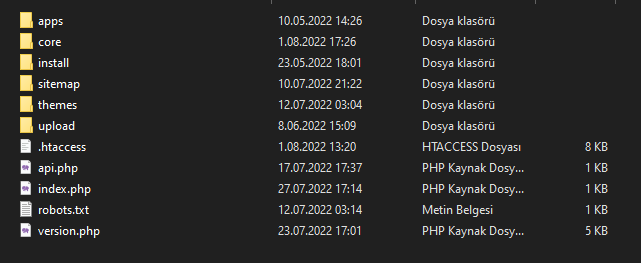
Now upload everything (including hidden files like .htaccess) to root folder of your server as mentioned above and then
open core/settings.php
Let's start installation The most enjoyable part
After completing the previous steps, and after the folder I asked you to open, you will see the part of the script required for database connection as shown in the picture below.
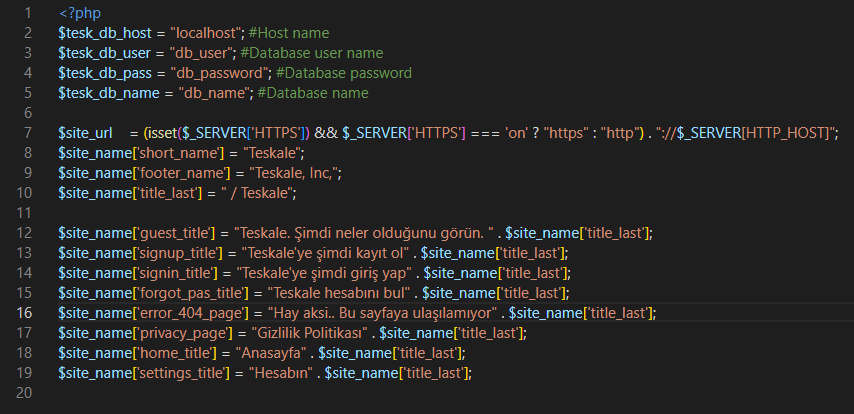
Here are the places you need to edit according to your own server information:
$tesk_db_host = "localhost";
$tesk_db_user = "db_name";
$tesk_db_pass = "db_password";
$tesk_db_name = "db_user";
After making these settings, transfer the SQL file named " teskale-sm.sql " located in the main directory of the downloaded file into the database you have installed.
What's next?
If you have done the above steps without any problems, you should now visit your site. (www.yoursite.com)
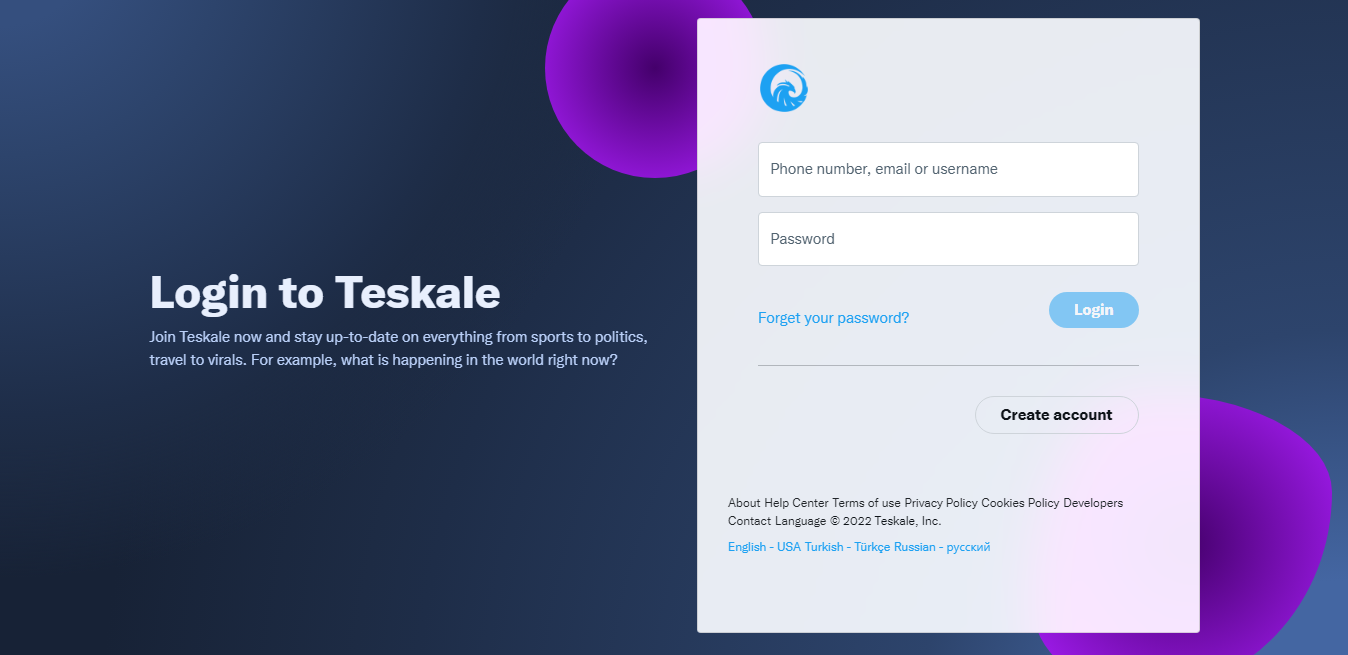
Use the following information to log in as an administrator:
Username: admin
Password: admin
F.A.Qs & Troubleshooting Here are our answers
Explanations, documents and, if necessary, articles are the areas where answers are shared for questions or problems from you. You can easily find any topic that comes to your mind here.
Basic questions about Teskale script
1. Where can I access Admin panel?
Login to the site using Username: admin and Password: admin , and then visit http(s)://www.YOURSITE.com/admin_panel/.Make sure you have "/" slash at the end.
2. What PHP framework Teskale is built on?
Teskale does not use any types of frameworks, the script is full pure PHP code, with the exception of third-party libraries SDK and other3. When will the next updates be released and what will the features be?
There is no specified date for every new update. Developers do this at their discretion, but Teskale is regularly updated and improved.4. Which host provider do you recommend for Teskale?
The Teskale script is designed to run even on the lowest hosting package. No special hosting company is needed for the best working principle of this script.It is sufficient to have the technical specifications specified in the server requirements section above on your server.
5. Can I use Teskale in more than 1 domain?
It depends on the type of license you have purchased.There are two types of licenses for this script, Regular license and Extended license
Please check Envato Help Page for more information about licenses http://codecanyon.net/licenses/standard
Teskale common Troubleshooting & Solutions
1. Why I get 500 internal service error?
The root of this error is not caused by the script. The 500 error is due to the problem or problems on the server side. This may cuase due folder permissions error, Web server issue, please contact your host provider and let them fix it for you.2. Why do I get 404, when I open any page?
2. Please make sure that the.htaccess file is uploaded to your server and updated to latest version.2. If the file is exists, but you still face this issue, please contact your host provide, and let them enable
mod_rewrite.3. If you are using a VPS with Ubuntu Linux installed, please follow this guide.
3. Why am I getting an error while uploading a video or image
There could be several reasons for this problem:1. The upload folder has no write rights. Just chmod it to 666
2. Your disk storage limit on the server has been reached.
3. The file you are uploading exceeds the limit specified in the PHP settings.
Increase upload_max_filesize & post_max_size values in main php.ini file of your server
4. The file format you are uploading is not supported by the Teskale script
Teskale features & Script customization
1. Where can I change the language texts?
All texts of the site's languages are located in core/language ".php" files in the very core of the script.
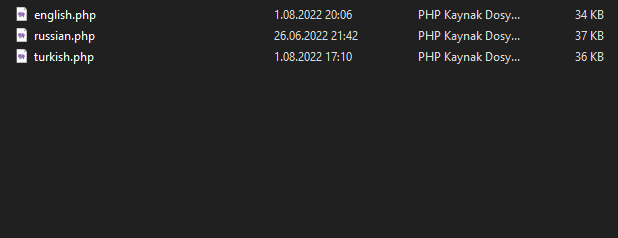
Open the file with the name of the language you want to edit. For example english.php
There we find the text we want to change, for example $tesk_translate['welcome_to_site'] = "Welcome to Site";
When we want to add a new sentence, we add it as follows:
$tesk_translate['the_word_you_want_to_add'] = "The word you want to add";
Please note that you need to add the new sentence you add here to all languages. And, the maximum length of your keyword_space_in this_shape should be 28 characters.
2. Where can I modify the HTML/JS code?
All HTML code and most of the JS code are in filename.phtml or filename.php files grouped and separately for each page of this script.
Open folder in themes/apps and you will see folders named according to script pages.
For example, you want to change the html code of the homepage, then you need to open the file: theme/apps/home
content.php main file that contains the page (HTML) code
scripts/app_master_script.phtml JS file that contains the page (JS) code
Thus, you can edit all other pages of the Teskale script if you clearly understand what you are doing and have sufficient competence in this matter.
3. Where can I edit the CSS styles?
The styling we use in this script is (CSS) only. We don't use (SCSS) for these script styles yet.
All the style files in the script are located in the themes/apps/statics/style folder.
Also, after making changes, sometimes they are not displayed in the browser due to the cache. You need to clear your browser cache to see your changes.
4. How can I change the logo and favicon?
Open the themes/statics/images folder and replace these logo.png & favicon.png files with yours, respectively
Recommended logo size is 1000x1000 pixels
4. How can I change the logo and favicon?
Open the themes/statics/images folder and replace these logo.png & favicon.png files with yours, respectively
Recommended logo size is 1000x1000 pixels
Script update
Ho to update my Teskale website?
If you have missed one or two or v1.x.x updates, and you want to update your site to latest version, you have to update your site version by version manually.
E.g. Before applying the latest updates to your site, you need to install previous updates, or rather, all versions of the update, from your current version to the latest version.
For example, your current version is: (v1.0), and the latest version of the script is: (v1.0.4), in such cases, you must install these previous versions (v1.0.1, v1.0.2, v1.0.3), before installing the latest version v1.0.4
If you did everything as described above, then before starting the update, download the latest version of the script from here: CodeCanyon | Downloads
Once you have downloaded the latest version of the script, unzip it and you can find the update files in Updates folder, as shown below:

Open the folder with the update you want to install and upload to the root folder of your script on your server and overwrite all files (Select all, files and folders, .htaccess also) that are in the update folder that you chose to install
If you do everything carefully, as described above, then your script will be successfully updated without any problems. However, if you have any problems with updates, then contact us for technical support: robertdayzen@gmail.com
Customers support
I have a problem for which here is no answer, what to do?
If you need support, or if you're facing any problems, please E-mail us at robertdayzen@gmail.com Please note that our respond can take up to 3 business days.
Please do not forget to attach a purchasecode to your message, otherwise technical support will ignore your request
What does the support include?
You can contact our support center with the following questions.
Technical questions about Teskale features
Assistance with reported bugs and issues
Please note that all requests other than those listed above will be ignored.